
Which Business Processes Should You Hand to AI? How to Find the Right One First
The process worth giving to AI is rarely the one you notice. How to find it across your calendar, inbox and task tool, check it's ready, and track it after.
On this page
Ask a business owner which process they'd hand to AI first and most will name the one they hate doing. That's rarely the right one. The process that costs the most is usually quiet: the team keeps doing it so nothing breaks, and the evidence of how much time it takes is spread across five different tools.
The repeat meetings are in the calendar. The same client question arriving every week is in the inbox. The task that gets recreated every Monday is in the project tool. The call where someone explained the process again is in the meeting notes. No single tool shows that it's the same work, over and over.
Here's how to find that process, check it's ready for AI, and know whether AI actually helped.
| What you're looking for | Where the evidence usually sits |
|---|---|
| Work that repeats every week | Calendar, task tool |
| Requests and questions that keep coming back | Inbox, Slack |
| How the process is really done | Meeting notes, call recordings, the people who do it |
| Whether it's getting better after AI | Task tool, inbox, your own starting numbers |
1. Find the work that repeats
Start with one normal week. Go through the calendar, the inbox and the task tool, and write down everything that happened more than twice, as a task with a start and an end: "send the weekly client report", "onboard a new client".
At one law firm, this is how the biggest process showed up: background research, done the same way, on the same website, for every case. The paralegals were spending about 40% of their time on it.
Block an hour and go tool by tool: recurring meetings in the calendar, repeated requests in the inbox, recurring tasks in the project tool. Or talk through your week out loud and ask any AI chat to turn it into a list.
This is the step where the work is spread across the most places, and where having it together helps. In Binee, your Gmail or Outlook, Google or Outlook Calendar, ClickUp, Slack and meeting notes from Fireflies or Fathom sit on one screen, so you can ask the assistant which requests and tasks came back again and again this month. It checks your emails, meetings and tasks and answers with the sources, so you can see where each item came from.
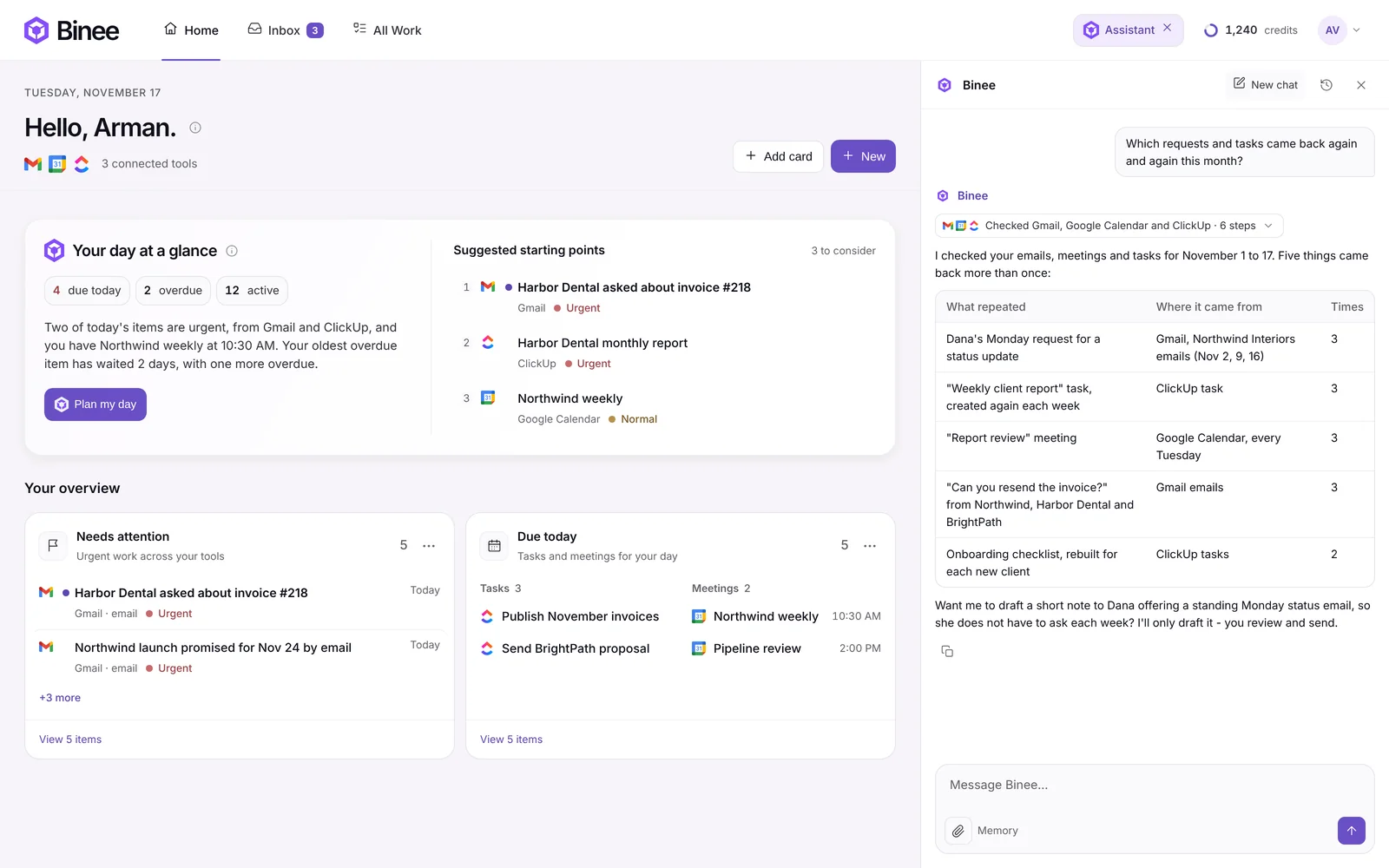
One thing no tool can tell you is how long each task takes. A connected assistant sees what's in your tools: items, dates, owners, statuses. The hours still come from you and your team.
2. Score them, and be honest about the hours
For each process, three questions: how often it happens, how long it takes each time, and what it costs when it goes wrong. How often times how long gives you the hours a week. What it costs when it goes wrong moves a process up the list: a late delivery or a messy onboarding can cost you the client.
Put the list in a table with those three columns and multiply the first two. If the top process is the one you hate most, check it twice: annoying and costly aren't always the same thing.
3. Check the process works without AI
Before AI touches a process, check it would work by hand. A simple test: if there were no software at all, could someone follow your instructions and get the same good result every time? If the steps aren't written down, if two people do it differently, or if nobody owns the final review, AI will repeat those gaps faster.
Record your screen while you do the task once, talking through each step, and ask AI to turn the transcript into numbered steps. Then look for the gaps: missing steps, unclear decisions, no owner.
The law firm's research process broke down into five steps: open the website, search by keywords, compare with existing results, compare with the client's request, write the report. Each one repeated the same way, and a paralegal could check the result quickly. That's why AI could take it on: research that took about 3 hours per case now takes about 10 minutes, and a paralegal double-checks the report.
4. Track it after AI takes over
Write down how long the process takes before you switch AI on, then compare every week. A new process usually needs two or three weeks to work well. Check almost daily in the first week, weekly for the next two or three, and every few months after that.
Keep a simple sheet: date, runs, time per run, mistakes AI made, time spent checking. The numbers tell you which step needs fixing next.
This is the second place Binee does real work. Once the process runs, you can ask the assistant where it got stuck this week, which requests are still waiting on someone, or which tasks went overdue, across your inbox, calendar and task tool at once, without opening each one.
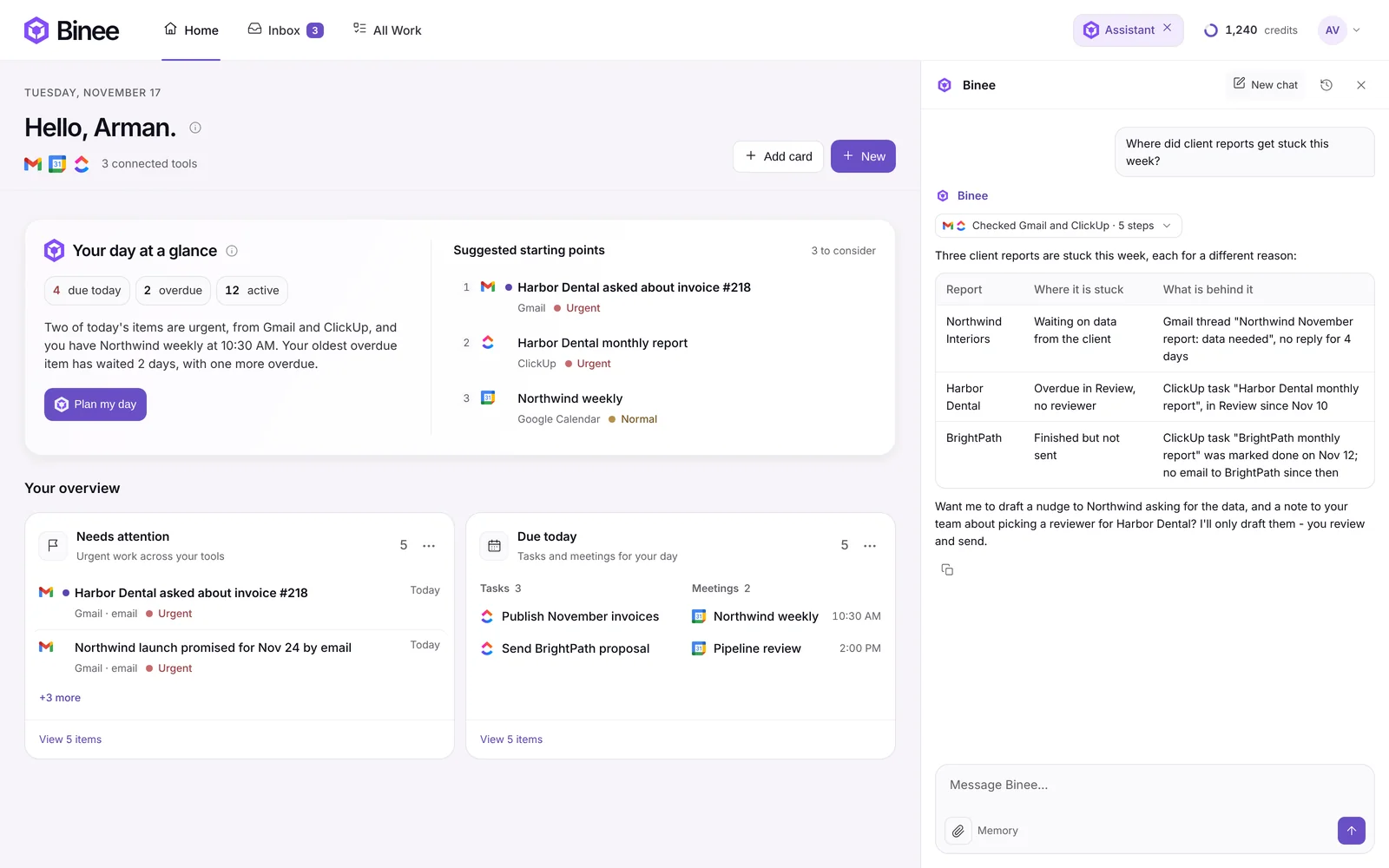
Why the right process is so easy to miss
The costly process doesn't look like a problem. It gets done every week, by people who know it well, and nobody complains about it because it works. The time it takes is never in one place: it's a meeting here, an email thread there, a task that comes back every Monday. Owners notice the work that annoys them and miss the work that quietly eats the most hours.
That's why finding it takes a deliberate look across every tool, and why tracking it after AI takes over matters as much as setting it up.
Want AI to walk you through this? The free AI Consultant is a prompt you paste into ChatGPT, Claude or any AI. It interviews you, scores your processes and writes the first instructions for the AI part.
Get the free AI ConsultantSee your work from every tool in one place. Connect your email, calendar and tasks, and ask the assistant what keeps coming back. No credit card needed.
Try Binee Pro free for 14 daysThis article pairs with two others: the step-by-step guide with the exact prompts, on Arman Solves, and why the order matters more than the tool, on the Tecknocity blog.